


BallparkDJ Walkout Intros
4.7358.00 Reviews
App Specs
- Version
- 24.5
- Updated On
- License
- Free
- Downloads
- 100,000+
- Developer
- BallparkDJ
- Categories
- Sports
- Platform
- Android
Screenshots
 Analysis by AppCompare
If you’re like me and love attending sports games, you know there's nothing quite like the energy that builds up when a player walks out to their own personalized intro. Enter BallparkDJ Walkout Intros, an app designed to bring that professional arena feel right to your local fields. I recently downloaded it out of curiosity and, to be honest, I got hooked. So, let's dive into what makes this app a game-changer for sports enthusiasts.
Where game-day plans can get stuck
A walkout intro sounds simple until several people are waiting for their turn, music is playing nearby, and the person running the speaker has to find the right player quickly. That is where I think this app’s value becomes clearest: it gives a team a dedicated way to prepare personalized announcements rather than relying on someone to improvise every introduction at the field.
The practical trade-off is that the app is only one part of the setup. The phone, speaker, music, and person managing the lineup all have to work together. I would not treat the first inning as the time to build intros or test an unfamiliar connection. Preparing the lineup ahead of the game makes the experience feel polished; trying to make creative choices while players are already waiting can turn a fun touch into one more job for a coach or parent.
Checks that make preparation easier
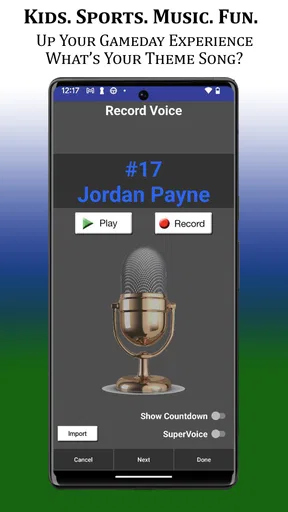
Before game day, I’d confirm that each player’s name is entered the way the announcer should say it, then listen to the intro rather than assuming the written name will sound right. Names with unusual spellings or pronunciations deserve an extra check. That small review can prevent an awkward moment when a player is introduced in front of the team and families.
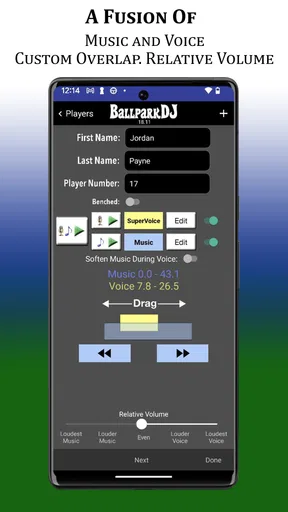
I’d also listen to the voice and music together at a comfortable volume. A track that sounds exciting on its own may compete with the announcement, especially through a speaker in an open field. The ability to adjust the balance is useful here: the goal is not simply to make everything loud, but to keep the player’s name understandable. If you use your own music, test the exact selection you plan to play rather than making the decision from memory.
For a team with a full lineup, it helps to settle on a consistent approach before making every intro. Decide whether the announcements should feel playful, dramatic, or low-key, and keep the volume and timing in mind across the group. This is not about making everyone sound identical. It is about avoiding a lineup where one intro is startlingly louder or much harder to hear than the next.
Setting the Stage with Ease
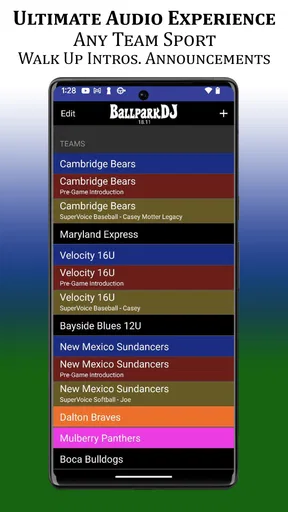
The first thing that stands out with BallparkDJ Walkout Intros is how easy it is to get started. You don’t need to be a tech wizard to navigate this app. Once you download it, you’ll find a straightforward interface that guides you through the process of creating your intros. Whether you’re creating a walkout for your kid’s Little League team or your own softball league, the app makes it a breeze.
Worth Reading Before You Choose

Flipboard Shows What News Apps Must Do Beyond the Feed

Switching to Android Auto Means Rethinking Your Driving Routine

Google Calendar Makes a Crowded Week Easier to Manage

Ludo King Makes the Most of the Minutes Between Plans

Baby Panda World Brings Quick Play to Modern Phones, but Its Game Library Feels Busy

ESPN’s Live Game View Makes Following Close Games Easier
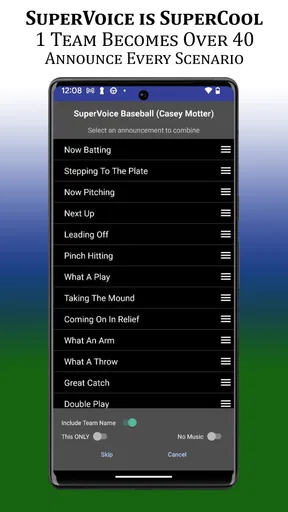
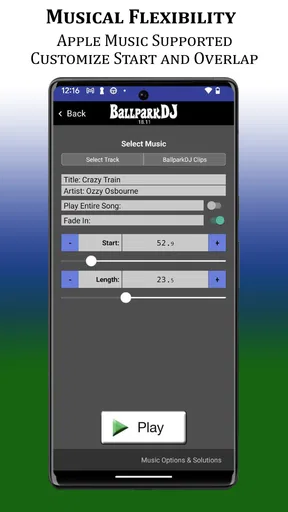
You simply enter the player’s name, choose from a variety of voice options, and add some background music. The app offers a nice selection of tracks, but you can also add your own if you’re feeling a bit DJ-like. What’s cool is the ability to mix and match, allowing you to create something truly unique. It’s like having your own personal announcer in your pocket.
Customization is Key
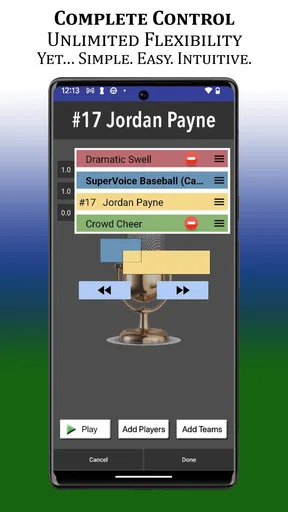
One of the standout features for me is the level of customization. The app doesn’t just offer a one-size-fits-all solution. You can tweak everything from the pitch and speed of the announcer’s voice to the volume balance between music and voice. This means you can really tailor each intro to fit the vibe you’re going for.
And let’s not forget the music. Whether you're into rock, pop, or something more dramatic, there’s a track to suit every taste. The ability to upload your own music is a fantastic touch, allowing for even more personalization.
Keeping the lineup manageable
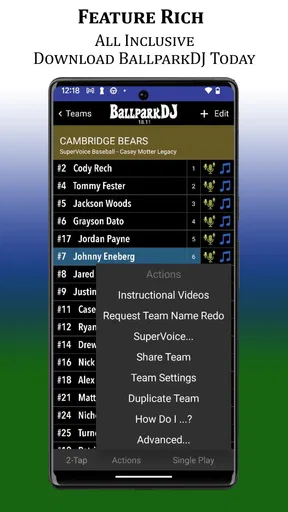
For a coach or team parent, the useful question is not only how to make one good intro, but how to avoid confusion when there are many. I’d build and review the players’ intros in a calm moment, then use the saved versions as a lineup rather than trying to remember which song belongs to whom. A consistent naming habit in your own notes can help too, especially when a substitute is handling the phone for the day.
There is a balance between personalization and speed. Giving every player a distinct sound can make the introductions feel special, but too many last-minute edits make it harder to keep the sequence moving. I’d treat the first version as good enough once the name is clear, the music fits, and the volume is sensible. Small refinements are worthwhile; repeatedly rebuilding an intro just before a game is not.
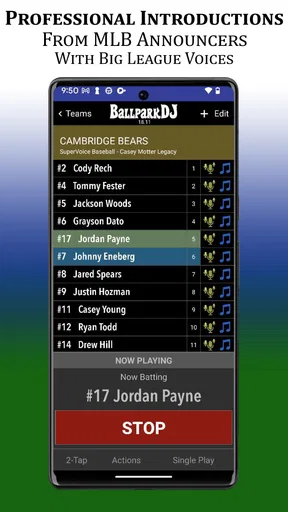
A realistic use case is a Saturday youth baseball game where a parent arrives early, checks the roster, and plays each intro through the team’s Bluetooth speaker before warm-ups finish. If one announcement is unclear, there is time to adjust it without the whole dugout waiting. At game time, the person running the music can focus on selecting the next player instead of creating content on the spot. That division of work is a simple but meaningful way to make the app feel less like a distraction.
Performance on Game Day
So, how does it fare when you’re out on the field? The app performs like a champ. I tested it during a local baseball game and the sound quality was surprisingly good. The app plays loud and clear, making sure everyone from the dugout to the stands can hear the intros. The only thing you need is a Bluetooth speaker, and you’re all set.
The ability to save multiple intros is another handy feature. This is perfect for coaches or team managers who need to keep track of several players. You can quickly switch between intros without a hitch, making it seamless to run through the lineup.
Recovering when something goes wrong
If an intro does not play as expected, I would first pause and check the simple parts of the chain: is the phone connected to the intended speaker, is the speaker on and audible, and is the correct player selected? Then I’d try a short test playback before restarting the entire setup. These checks are more useful than immediately rebuilding the intro, because the problem may be the connection or the selected output rather than the saved announcement.
If the sound is faint or difficult to understand, raise the speaker’s volume gradually and listen from the area where families will be standing. A speaker that sounds clear beside the person holding the phone may not carry as well across a field. I’d also keep the phone close to the person managing playback so they can see what they are selecting and avoid accidental taps while moving around.
For a busy game, have a simple fallback: the person announcing can call the player’s name without music if the speaker connection becomes unreliable. That does not mean the app has failed; it means the game can continue while the setup is checked between turns. The best workflow keeps the announcement optional rather than making the lineup dependent on perfect audio every time.
When the app is not the cause
Outdoor sound is affected by more than the app. Crowd noise, distance, speaker placement, and a phone-to-speaker connection can all affect what people hear. If the intro sounds fine close to the speaker but is hard to hear from the stands, moving the speaker or adjusting its level may help more than changing the voice settings. I would test from a few spots around the field before deciding that the recording itself needs work.
Music choice can also change how clear the announcement feels. A busy or forceful track may compete with a voice even when the volume balance seems reasonable on a phone. This is where a short real-world test matters: listen through the same speaker you plan to use, in the place you plan to use it. If clarity is the priority, a simpler music choice may work better than the most dramatic one.
Compared with playing a song from a general music app and announcing names by hand, BallparkDJ is aimed at the personalized player-intro workflow. A regular playlist gives you broader control over music, but it does not provide the same focused way to prepare individual announcements. A microphone and live announcer may be preferable for a larger event or a team that needs spontaneous commentary. For a youth team that wants repeatable, player-specific walkouts without turning a parent into a full-time DJ, this app sits in a useful middle ground.
Who will get the most from it
I see the best fit as coaches, team managers, and parents who enjoy adding a little ceremony to baseball, softball, or another team setting where players take turns being introduced. It is especially useful when the same person needs to prepare several names and keep the introductions organized. Players who like choosing music and hearing their name announced may enjoy the personal touch, too.
It is less suitable for someone who wants a general-purpose music player, a full live sound system, or a hands-off setup that requires no preparation. It also may not be worth the extra work for a team that prefers a quiet, quick transition onto the field. The app adds value when announcements are part of the fun; if the priority is simply getting the game started as fast as possible, a straightforward verbal introduction can be enough.
Why It’s Worth a Download
Overall, BallparkDJ Walkout Intros is a well-crafted app that delivers on its promise of bringing professional-level intros to local games. Whether you’re a coach, a parent, or a player, this app adds a layer of excitement and professionalism that’s hard to beat. It’s not just an app; it’s an experience that turns every game into something special.
As a sports app from developer BallparkDJ, it has a focused purpose rather than trying to be a general audio tool. It is free to download, rated for Everyone, and has a 4.7 average from around 2.9 thousand ratings, with over 100 thousand installs. The current version is 23.3.7 and it requires Android 8.0 or later. In-app purchases are available at $6.99 per item, so I’d check the options in the app before committing to a particular setup; the free download does not mean every possible purchase is included.
One question I’d settle before a season begins is who will manage the intros. A single responsible person reduces duplicate edits and keeps the sequence familiar, while a backup person can learn the basic playback routine in case the usual operator is absent. Another useful decision is whether each player chooses their own music or the team agrees on a shared style. The first gives kids more ownership; the second can make a lineup feel more cohesive and easier to prepare.
So, if you’re looking to add that extra spark to your games, give BallparkDJ a try. It’s easy to use, offers fantastic customization, and most importantly, it brings a ton of fun to the field. Just make sure your phone’s charged, and you’re good to go!
Pros
- Intuitive interface for easy navigation
- Customizable voice intros and music
- Wide selection of voice-over artists
- Seamless integration with playlists
- Supports multiple sports types
Cons
- Limited free features without subscription
- Occasional bugs in voice playback
- No offline mode available
- Requires stable internet connection
- Music library could be expanded
FAQs for BallparkDJ Walkout Intros
What is BallparkDJ Walkout Intros used for?
BallparkDJ Walkout Intros is an app designed to create personalized walkout music and voice intros for players in sports. It’s popular among teams looking to add a professional feel to their games, enhancing the experience for players and spectators with custom audio clips.
Is BallparkDJ Walkout Intros easy to use for beginners?
Yes, BallparkDJ is user-friendly and designed for users of all skill levels. The app provides a straightforward interface for creating intros, allowing you to easily select music, record voiceovers, and adjust audio settings without any prior experience in audio editing.
Can I use my own music in BallparkDJ Walkout Intros?
Absolutely! BallparkDJ Walkout Intros allows you to import your own music files, giving you the flexibility to use tracks that match your team’s spirit. You can seamlessly integrate these with voiceovers to create a unique sound for each player’s walkout.
Does BallparkDJ Walkout Intros work offline?
Yes, once you have downloaded the app and any necessary music files, BallparkDJ can work offline. This is particularly useful for games held in locations without internet access, ensuring your intros are ready to go whenever needed.
Are there customization options available in BallparkDJ Walkout Intros?
BallparkDJ Walkout Intros offers a range of customization features. You can adjust the timing of music and voice intros, apply sound effects, and tweak audio levels. This flexibility helps create the perfect atmosphere tailored to your team’s needs and preferences.


